
What this is for. Courses in OneDive use four words: a course, a class, a student and class staff. The course is what you teach. A class is one run of it. Students take seats in a class, and staff teach it. This page is the map: what each word means, where you find it, and how a class and a student move from start to finish. To set up your first course, start with Your first class.
The four words
- Course. What you teach, like Open Water Diver, with its agency, level, price and class size. You set it up once.
- Class. One run of a course, with its dates, a place and a lead instructor. A course can have as many classes as you like. Seats are sold in a class.
- Student. A customer enrolled in a course. Most students are in a class. A student who paid before you picked their class waits under Awaiting a class on the course's page.
- Staff. People from your team working a class: the lead instructor, co-instructors, divemasters and others. Staff don't take seats. See Class staff and the lead instructor.
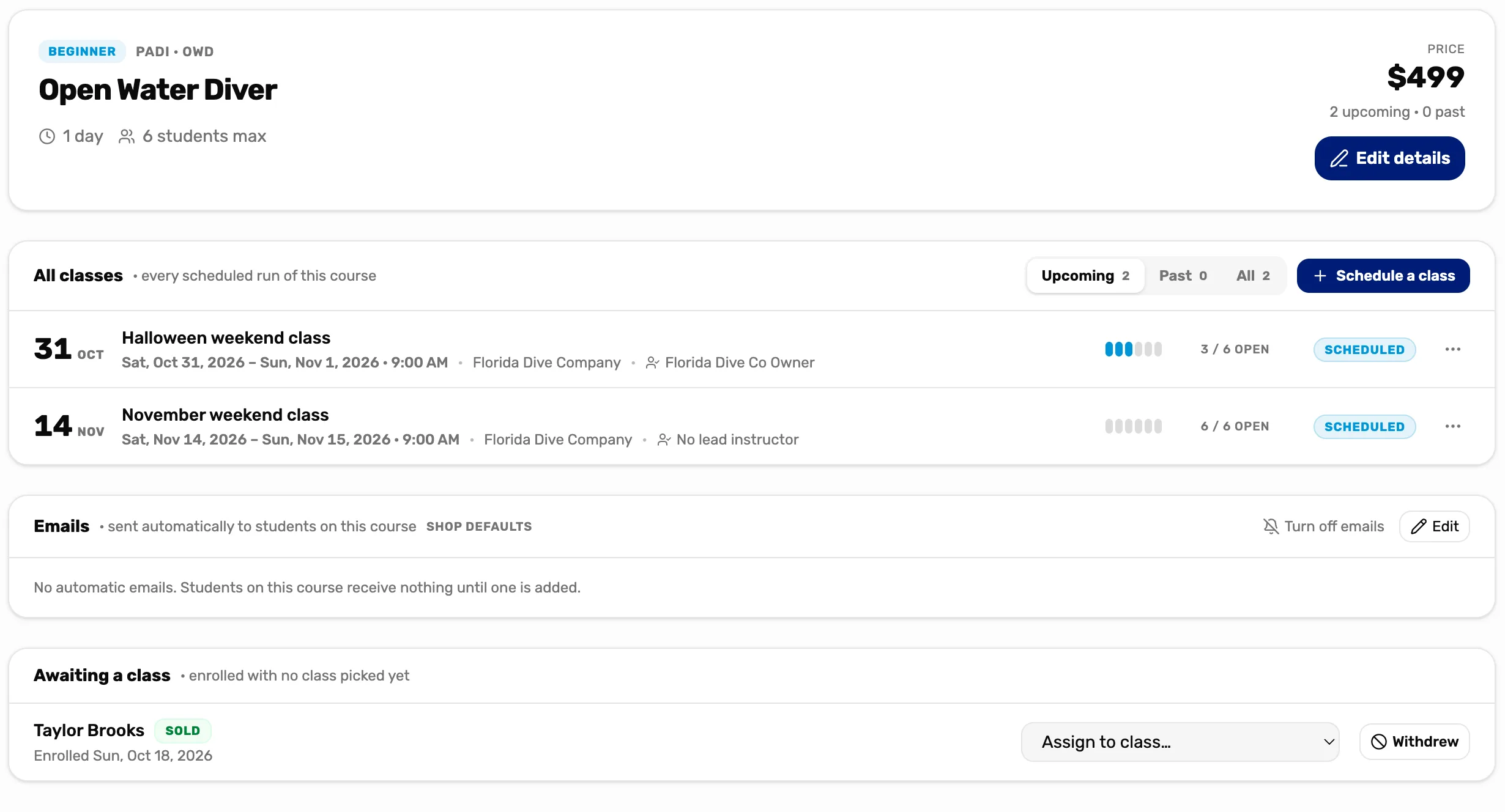
- The course. Its name, agency, level and price. Edit details changes them.
- All classes. Every class of this course. Upcoming, Past or All.
- A class. Its dates, place and lead instructor. Tap it to open the class page.
- Seats. Seats left out of the class size, like 3 / 6 open. It reads Full when none are left.
- Awaiting a class. Students enrolled in this course with no class yet.
Where each one lives
- Every course is on Courses, grouped by agency. The Active tab is what you teach now. Archive, in a course's three dots, moves it to Archived and takes it out of the register. Restore brings it back. Each card says when the next class is, or No class scheduled, and how many students are waiting, like 2 awaiting a class.
- A course's classes are on its page: tap the course's name. Under All classes, Upcoming lists the classes still to come, and Past the ones that are over or marked completed.
- A class's students and staff are on the class page: tap the class. Students is the class list, Staff is who's teaching, and Actions at the top changes the class itself.
- Selling a seat happens in the register: the Courses tile, then the course, opens Book course. See Sell a class seat.
- A student's classes are on their customer page, on the Classes tab, with their progress in each. See The customer drawer, tab by tab.
- Classes on your schedule are in the Calendar, in purple, with how many students are enrolled. See The calendar, explained.
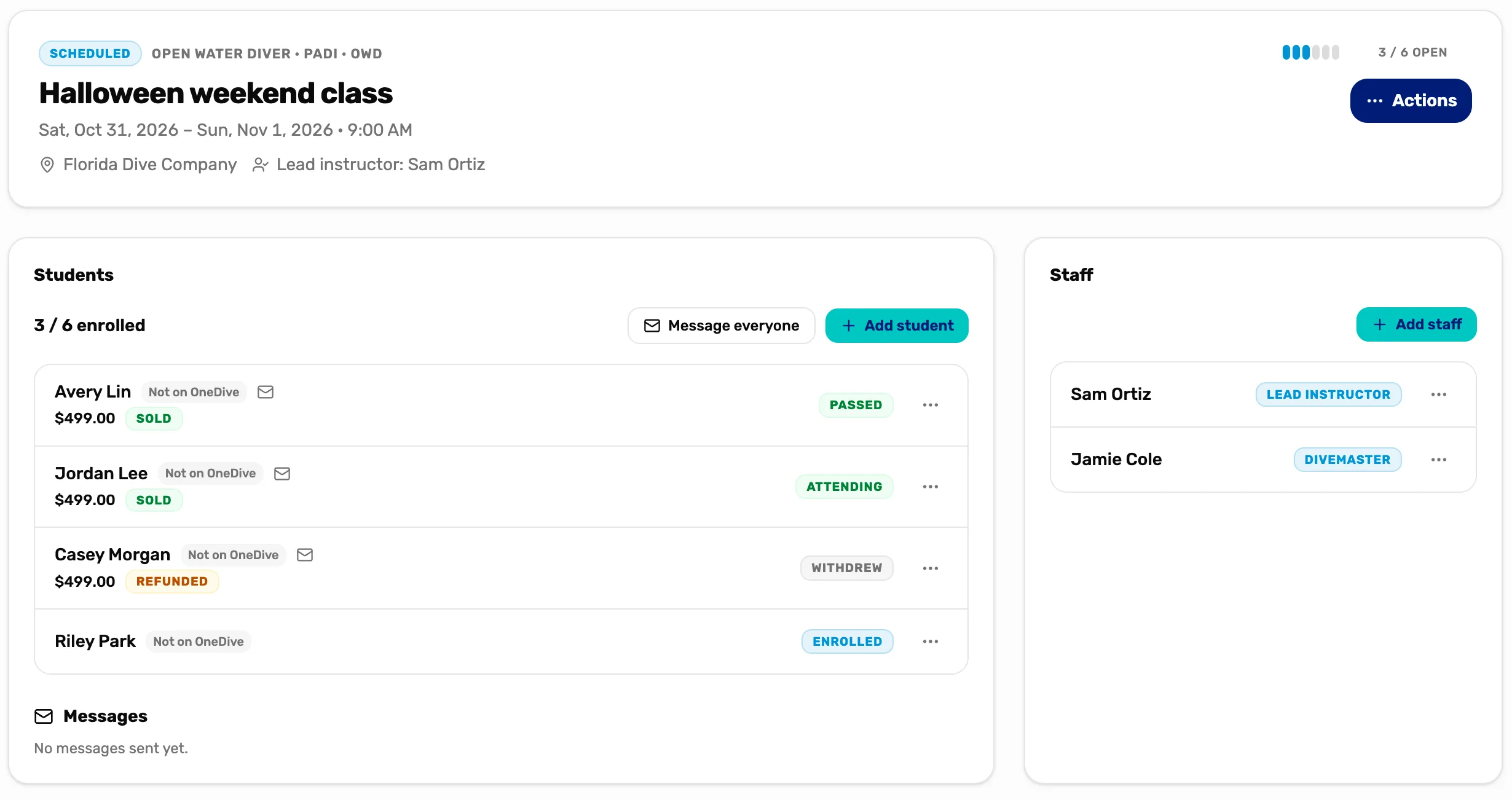
- The state. Scheduled, Active, Completed or Cancelled. See below.
- Lead instructor. Who runs the class.
- Actions. Edit the class, mark it active or completed, or cancel it.
- Students. The class list, with each student's state. 3 / 6 enrolled counts the seats taken.
- Staff. Who's teaching. They don't count against the class size.
The life of a class
A class is always in one of four states. You change it with Actions on the class page. Nothing changes it on its own: a class whose dates have passed stays Scheduled until you mark it.
- Scheduled. Every new class starts here. Seats can be sold.
- Active. You tapped Mark active: the class has started. Seats can still be sold.
- Completed. You tapped Mark completed: the class is over. It says "This class is completed — no new students." It moves to Past, and the register no longer offers it. Mark active reopens it if you completed it by mistake.
- Cancelled. You tapped Cancel class. It says "This class is cancelled — no new students." It can't be reopened. The students stay on its list so you can move or refund each one. See Cancel a class or refund a student.
The register offers a class while it is Scheduled or Active, has a seat left, and its last day isn't over.
The life of a student
Each student on a class page has one state, shown on their row. You change it with the three dots on the row.
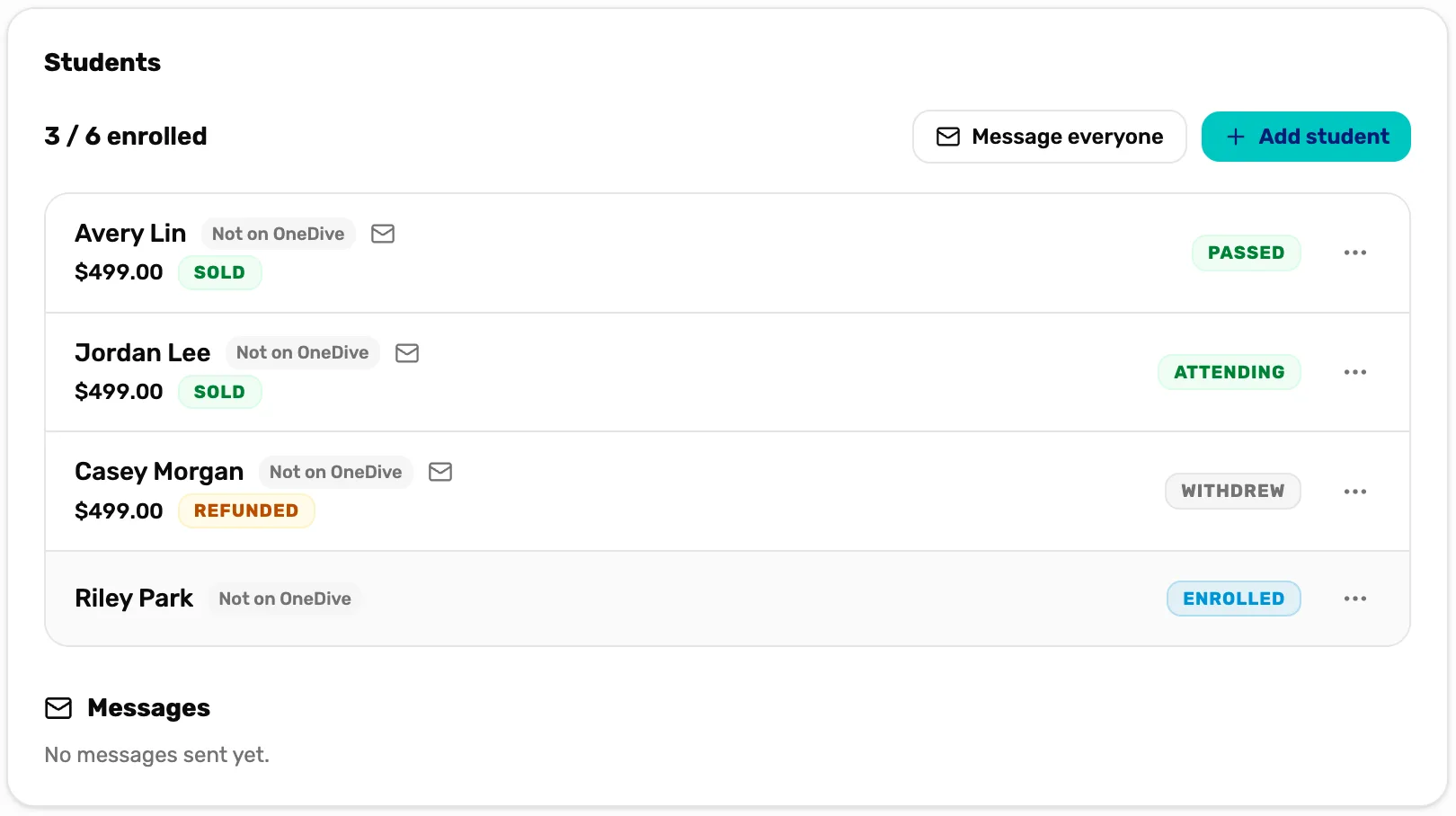
- Passed. Avery has a result.
- Attending. Jordan has started.
- Enrolled. Riley is in the class and hasn't started. Riley has no Sold tag, so they were added on the class page without a sale.
- Withdrew. Casey left the course. Their seat is free again.
- Refunded. Casey's sale was refunded. Sold means it was paid at the register.
- 3 / 6 enrolled. Withdrew and No-show students don't count.
- Awaiting a class. Enrolled and usually paid, with no class yet. Shown on the course page, not a class page. See Students waiting for a class.
- Enrolled. In a class, not started yet.
- Attending. Marked as started.
- Passed or Failed. Their result. Every student should have one, or Withdrew or No-show, before you mark the class completed.
- Withdrew. Left the course.
- No-show. Never came.
A Withdrew or No-show student no longer takes a seat and no longer gets course emails. Reinstate, on their row, puts them back if the class has a seat and is still running. The steps for each state are in Run a class and complete it.
Money and seats
- A seat is paid for at the register. The student's row says Sold. A student added with Add student on the class page has no sale, so no tag.
- A refund doesn't free the seat. The row says Refunded, but the student stays on the class until you mark them Withdrew.
- Withdrew doesn't refund. It only frees the seat and stops the emails.
- Cancelling a class doesn't refund anyone. Refund each student who wants their money back.
The full rules, in order: Cancel a class or refund a student.
Who can do what
- Anyone at the register can sell a seat in a class.
- The owner, a General Manager or a Manager see the Courses tab. They schedule, edit, run and cancel classes, put staff on them, and mark each student's progress. They also refund a sale.
- The owner or a General Manager add and change courses, archive them, and set up the course emails.
Instructors, divemasters and other staff don't see the Courses tab. Being on a class doesn't give them access to it. To show them their week, share the calendar feed: see Put your calendar in Google or Outlook.
What happens next
- Set up your first course and class: Your first class.
- Put your instructors on a class: Class staff and the lead instructor.
- Run the class to the end: Run a class and complete it.