
What this is for. How a seat comes off a trip depends on how it was paid. A seat booked online is cancelled and refunded to the diver's card in one go, from the trip's manifest, with its share of the OneDive booking fee. A seat sold at the register is two jobs, like any sale: refund its line in Settings › Transactions, then cancel the seat on the manifest. Do the right one and the seats, the money and the diver's emails all stay true.
The rules
- An online seat is refunded only from the manifest. It can't be refunded in Transactions.
- A register seat is refunded only in Settings › Transactions. The manifest's Cancel frees the seat but gives no money back.
- Refunding a register seat doesn't take the diver off. They stay booked, and the seat shows as owed again on the manifest and their customer page, until you cancel it.
- When you cancel an online seat, the diver gets the booking fee back for that seat. When you cancel the whole booking, all of what's left of it comes back.
- Once a slot has run, an online seat can't be cancelled. That's from a day after it started. See After the trip.
Cancel an online seat and refund the card
Go to Trips, choose Manage trip, and tap the date under All departures. On the Manifest, tap the three dots on the diver's row and choose Cancel and refund, with the amount.
A booking with several seats asks What to cancel. It starts on the whole booking when you open it from the booker's own row, and on that one seat from anyone else's.
- This seat only cancels the one diver's seat. The rest of the group stays booked.
- The whole booking cancels every seat the booker paid for.
- The lines show what goes back: the seats, any rental gear, the tax and the OneDive booking fee. Back to the card is the total, to the card that paid. "Refunds take 5 to 10 business days to show."
- Who is cancelling? is The diver asked or The shop is cancelling. It's for your records. The refund is the same either way.
- A note the diver will read is optional, up to 200 characters.
- Cancel and refund, with the amount, does it. Keep the booking changes nothing.
You see "Cancelled." with the amount on its way back to the card. The seat is free again. The booker is emailed, and so is any diver who had claimed a seat that's going. Any rental gear on the seat goes back on the shelf, unless it's already out with them. If it couldn't, the message says so: sort it out in Rentals.
A booking with one seat goes straight to the amounts. It's the same as in When a diver books.
Follow the refund
The departure now has a Refunds list, at the top of the manifest. Each refund shows who it's for, how many seats, the amount and where it is. A Failed one has Retry and a line under it saying what went wrong.
What each state means:
- On its way and Sent to Stripe. Normal. It moves on by itself.
- Refunded. Done.
- Not sent yet, with a number of days. OneDive is still trying. If it's still there the next day, contact support.
- Sent, a number of days ago, not confirmed. Tap Check with Stripe. It reads Checking with Stripe for a minute. If Stripe never made the refund, it is sent again.
- Failed. Read the line under it. The most common is a Stripe balance too low to pay it: add funds in Stripe, then tap Retry.
- Stripe reversed this refund. It went through, then the diver's bank sent it back. The diver didn't get the money. Retry sends it again.
See refunds that need a look
You don't have to check every departure. When a refund needs you, the top of the Trips page says so. An amber card says how many refunds need a look and lists each one: who, how much, the trip and date, and its state. Open the departure opens that date's page, where its Refunds list has Retry or Check with Stripe. The card goes away when none need a look.
It lists refunds that failed and can be retried, ones Stripe hasn't confirmed after three days, ones not sent after a day, and ones Stripe reversed.
Take a register seat off
A seat sold at the register is refunded like any sale, then cancelled on the manifest.
- Refund the seat's line. Find the sale in Settings › Transactions and refund the seat's line, named after the trip. A seat paid as a deposit and then a balance has two sales: refund the line in each. The steps are in Find a sale and refund a line. Your return window applies: see Refund rules.
- Cancel the seat. Open the departure, tap the three dots on the diver's row, and choose Cancel. It cancels straight away, with no check first.
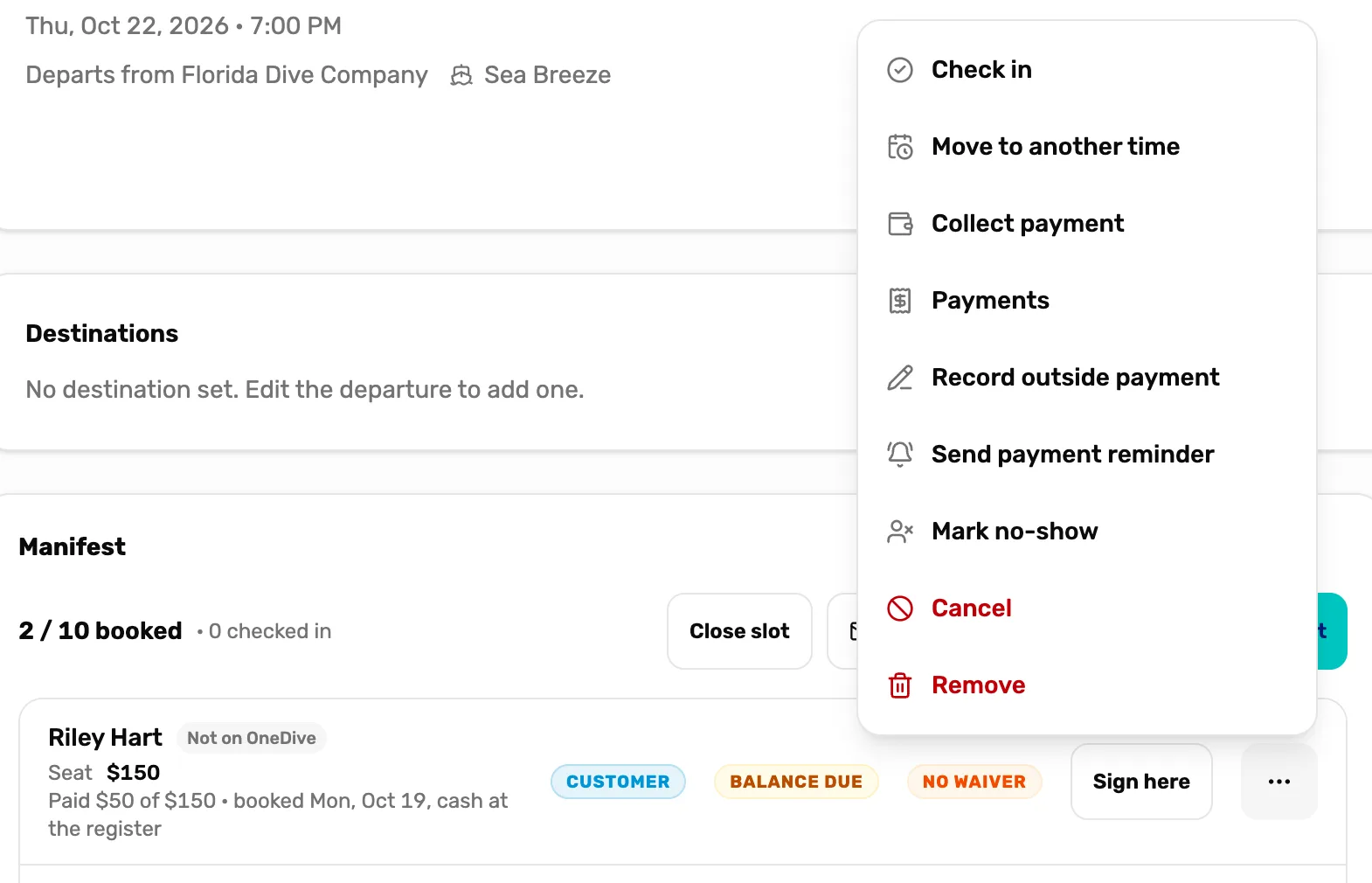
- Cancel. Frees the seat. The row says Cancelled and moves to the bottom. Money isn't touched.
- Remove. Takes the row off the manifest for good.
- Reinstate in the same menu puts a cancelled seat back, if the date still has room.
- Remove asks you to check, like "Remove Sam Okafor from this departure?" It's refused while the seat has money on it: "Refund this customer's payments before removing them."
Register seats on a closed slot
When you close a slot, register seats that took money can't go back to a card from there. Each shows Refund in person with the amount, and stays on the list until you deal with it.
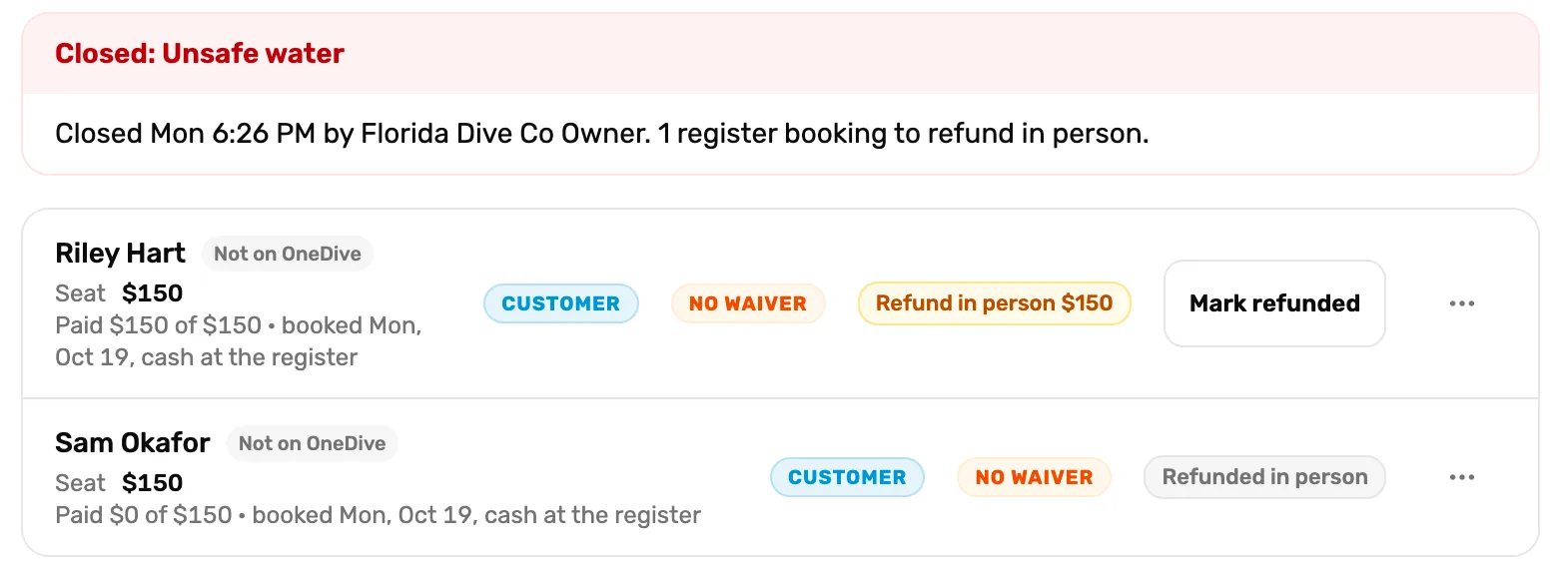
- Refund in person. What this diver paid at the register.
- Mark refunded. For money you gave back some other way.
- Refunded in person. Done.
- Best: refund the line in Settings › Transactions. The row changes to Refunded in person by itself, and your drawer and reports are right.
- Gave the money back another way? Tap Mark refunded. The row then says "The register still shows" the amount "paid. Record the refund under Settings, Transactions so the drawer balances." Undo refunded is in the three dots.
After the trip
Once a slot has run, Cancel and refund is refused with "This slot already ran. Refund from the register instead." An online booking can't be refunded in Transactions either, so if a diver who booked online needs money back after the trip, contact support.
What happens next
- Close a whole slot for weather: Run the day of the dive.
- What each refund method does: Refund rules.
- How online seats and register seats differ: Trips, departures, bookings and manifests.