
What this is for. Dealers only see a product once it is published, Active, and has its wholesale price, name and MAP. When a new product is missing from your dealers' view, one of those four things is usually the reason. Check them in this order, most common first.
Where you see it
Open Catalog. A product your dealers can't see is either waiting to be published, flagged red as needing details, set to Draft or Archived, or visible to a dealer you haven't approved yet. The sections below take them one at a time.
Not published yet
Imports and new products wait as drafts. When some are complete and waiting, an amber banner on Catalog says how many, for example "2 products are ready to publish", with "Dealers can't see them until you publish." and a Publish 2 products button. For one product the words are singular: "1 product is ready to publish" and Publish 1 product. Press the button and they go live.
No amber banner? Then nothing is ready yet. A product that is missing a MAP, a wholesale price or a name is not offered for publishing. Instead the green line at the top of the page carries a note with the count, as in the example below, where the draft "Help demo: Gloves" has no MAP. Go to the next section for those.

- The green line. Your catalog is published and visible to dealers. Its date is when the catalog was first published, not the last time you published.
- The note. Counts the products that need a MAP, a price or a name before they can be published. While it shows, those products stay hidden.
It needs details
A product with no wholesale price, no name, or no MAP above zero is hidden from dealers. It has a red flag in the list, and the Needs Details tile counts them. Press the tile to see only those products. Hold your pointer over a flag and it tells you what is missing, for example "Missing: MAP".
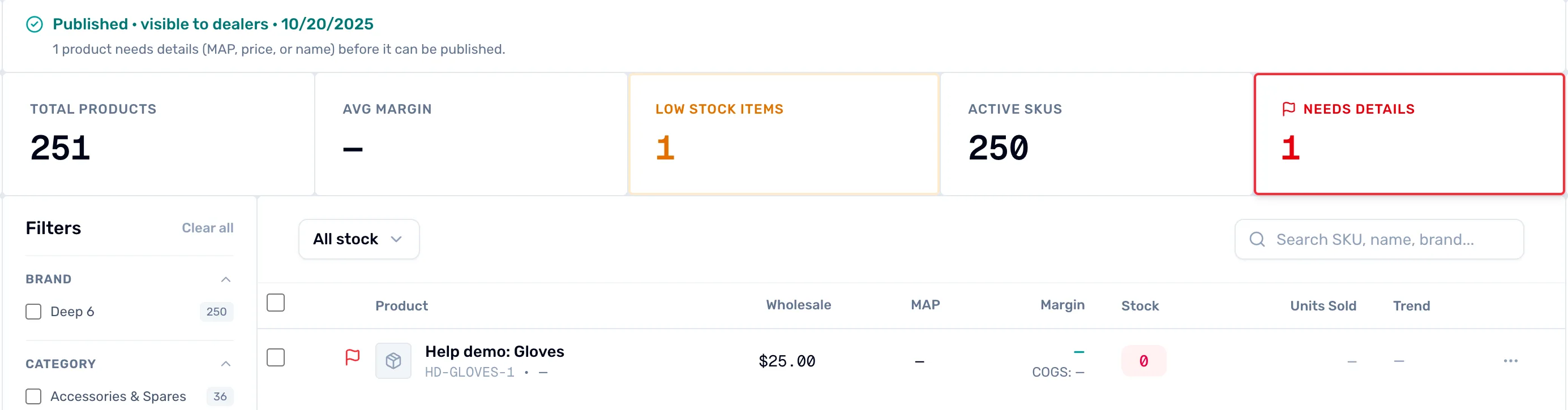
- The red flag. Hold your pointer over it to see what is missing.
- Needs Details. Shows only the products that are not ready to publish.
Fill in the price, the name or a MAP above zero, save, then publish. Fill in what's missing, then publish walks through it.
It is Draft or Archived
Open the product and look at the Status panel. Draft reads "Hidden — finish setup before publishing." Archived reads "Hidden but retained for reporting." Neither shows to dealers. Choose Active and press Save.
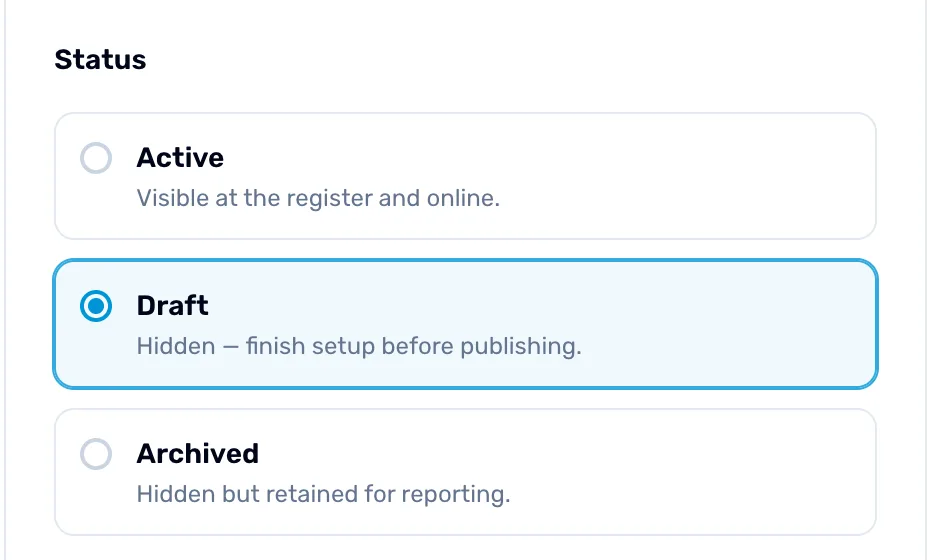
- Draft. The product is selected as Draft, so it is hidden.
- The line under it. Says why it is hidden: setup is not finished.
The dealer isn't approved yet
If the product looks right on your side, the dealer may not be approved yet. A dealer who isn't connected to you sees a lock where the price would be, and "Apply to see wholesale" on the product page. A dealer who has applied sees "Approval pending" while you decide. Approve them and they see your prices: Approve a dealer who applied.
Good to know
There is nothing to switch on per dealer. Your published products are listed for dealers on OneDive, and a dealer sees your prices once you have approved them. If a dealer's tier has no price for a product, the product stays visible and the dealer sees the price from your default tier, or your base wholesale price if there is none. If there is no price at all, they see "No price published yet".