
What this is for. Every plan runs the same register, with rentals, service, trips, courses and online booking. The plans differ in how much your shop can do each month, how many people and registers can use it, and whether OneDive takes a platform fee on card payments. This page shows today's numbers for each plan. They come straight from OneDive, so they are always current.
The three plans side by side
| Plan | |||
|---|---|---|---|
| Loading the current plans… | |||
| What you get | |
|---|---|
| Loading the current plans… | |
| What you get | |
|---|---|
| Loading the current plans… | |
| What you get | |
|---|---|
| Loading the current plans… | |
The platform fee is a share of each card payment the register charges through your own Stripe or Square account. Cash and checks never carry it. How the platform fee works.
Messaging One Dive Support from inside OneDive comes with Plus and Pro. On Free, you send us a ticket and we reply by email.
See your plan and how much you have used
Go to Settings › Subscription & Billing.
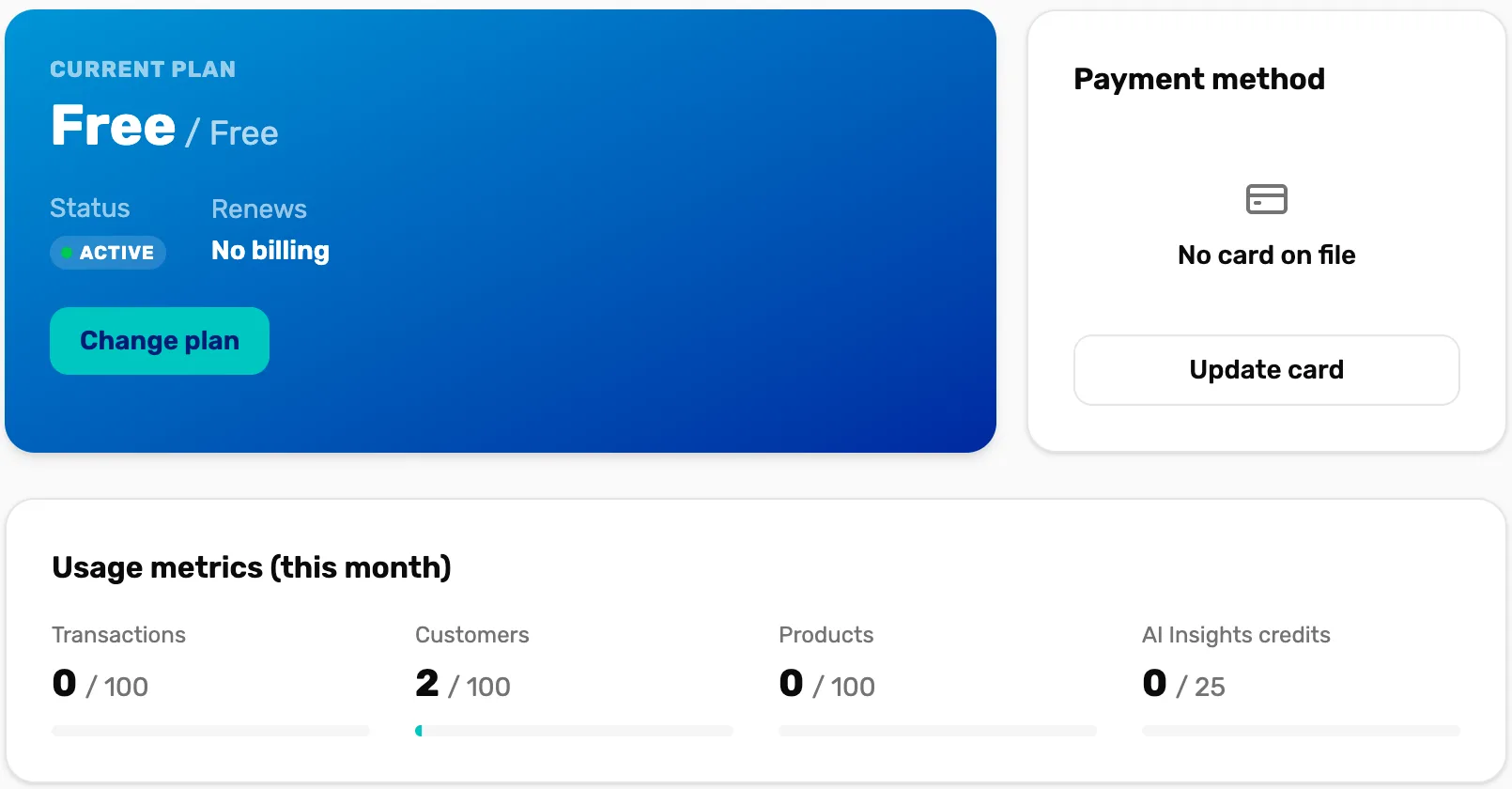
- Current plan. Your plan, its status and the date it renews. A Free plan reads No billing.
- Change plan. Opens the plan picker. Only the owner or a General Manager can finish a change.
- Payment method. The card your plan is billed to. Update card changes it.
- Usage metrics. What you have used next to your plan's limit. The bar turns amber at 80% and red once you go over.
Customers and Products count everything you have, not only this month.
What happens when you reach a limit
Nothing is ever deleted, and no sale already rung up is lost. Here is what each limit does:
- Transactions a month. This never stops a sale. Every sale and refund counts. Once you go over, the owner gets one email that month, and on Free the register shows a banner saying "every sale still goes through".
- Products. You can keep adding products. The register sells your oldest products up to your plan's limit. The rest stay in your catalog but don't show at the register, and scanning one says it "needs Plus".
- Customers. At the limit you can't add a new customer. The sale can still go ahead: choose Continue as guest. Online bookings still add the diver.
- Staff seats. At the limit you can't add or reactivate a user. You can always deactivate someone to free a seat in Settings › Users & Access.
- Registers. This counts registers used in the last 15 minutes. If too many are in use, the extra one shows a screen saying another register is in use. It clears by itself about 15 minutes after the other register goes quiet.
- Locations. Each location where a register runs counts. Free has …, Plus has … and Pro has …. To go past that, contact us. A location with no register doesn't count.
- Reporting. Every plan has Sales summary and Refunds & exchanges. A report your plan doesn't include shows a lock with the plan that has it, in Settings › Reporting.
Change your plan
Open the plan picker
In Settings › Subscription & Billing, choose Change plan. Tap a plan card to see what it includes. Your plan is marked Current plan.
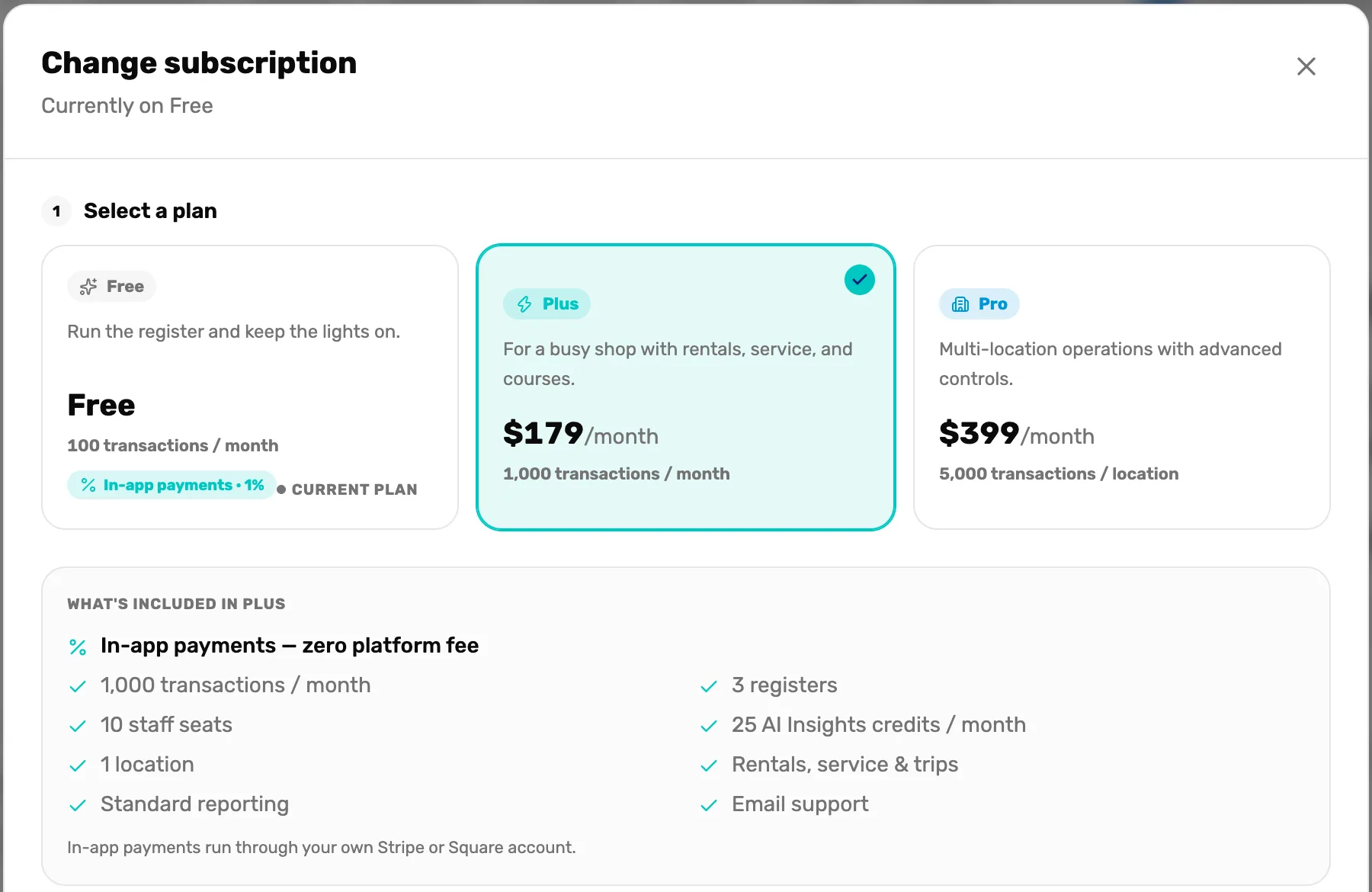
- Select a plan. Tap a card to choose it. The selected card gets a tick.
- What's included. Everything in the plan you tapped.
- In-app payments. The platform fee on card payments for that plan.
Check the billing summary, then pay
The Billing summary shows what you pay today and when the next bill comes. Moving up from Free, you pay today only for the days left in this month. After that the plan bills monthly.
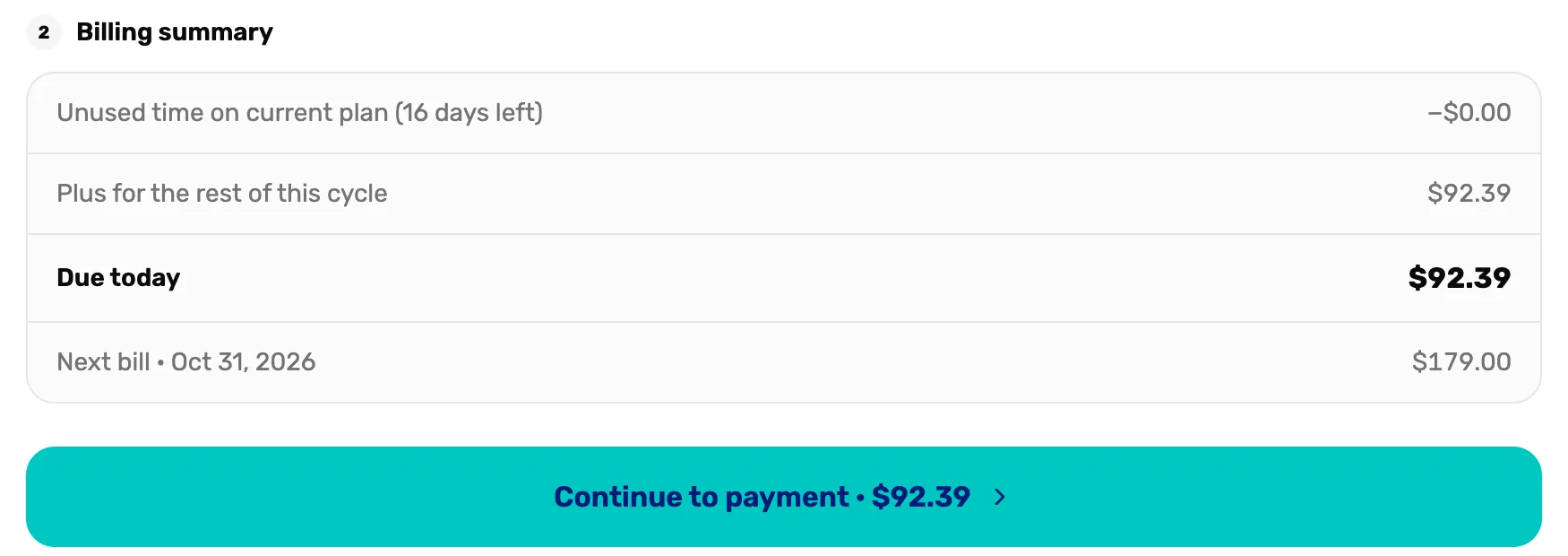
- Billing summary. What changes on your bill.
- Due today. Charged now, to your card on file or a new card on the next screen.
- Continue to payment. Goes to the card screen. Your plan doesn't change until you choose Pay there.
On the card screen, choose Card on file or Use a different card, then Pay. The new plan starts straight away. When nothing is due today, the button reads Switch to or Downgrade to instead, and no card screen opens.
Moving down a plan
- From Pro to Plus: the change happens straight away, and the unused part of this month comes off your next bill.
- To Free: you keep your paid plan until the end of the period you have paid for, then the shop moves to Free. Changed your mind? Pick your paid plan again before that date and nothing changes.
There is no separate cancel button. Choosing Free is how you stop paying.
What happens next
- The platform fee on card payments follows the plan you are on at the moment of each sale. Processing fees and the platform fee explains it.
- The Billing history card doesn't list paid invoices yet. It says it is coming soon.
- Not sure Plus pays for itself? The plan picker has an estimate. Type what you take by card each month and it shows where Plus becomes cheaper.